
Message Templates
Apptoto message templates let you build dynamic appointment messages using fields, filters, conditional logic, and media components.
Apptoto uses an enhanced version of the Liquid templating language for message templates and appointment pages. Templates are a mix of static text, dynamic fields, filters, conditional blocks, and — for voice messages — recordings.
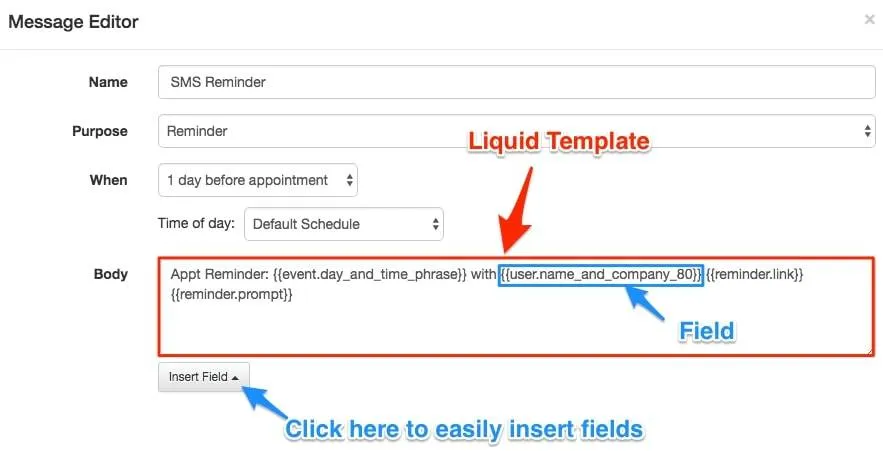
Templates apply to:
- Auto Messages (reminders, booking confirmations, follow-ups)
- One-Time Messages (Compose Tool)
- Appointment Pages
Template components
Section titled “Template components”| Component | Syntax | Purpose |
|---|---|---|
| Static text | Plain text | Content that is the same for every message |
| Fields | {{ field_name }} | Dynamic data pulled from each appointment or contact |
| Filters | {{ field_name | filter }} | Modify how field values are displayed |
| Conditional blocks | {% if ... %} ... {% endif %} | Show or hide content based on conditions |
| Voice recordings | {{ 'url' | play_mp3 }} | Play an MP3 file during a voice call |
| Buttons | Email editor button component | Prompt clients to confirm, cancel, or reschedule via email |
| Images | Email editor image component | Add images to email messages |
Email messages can also be written in Markdown (the default for new messages), HTML, or Plain Text — see the Markdown Primer for the syntax and how Fields fit in.
Articles in this section
Section titled “Articles in this section” Fields Insert dynamic appointment, contact, and participant data into your messages.
Custom Fields Extract custom key/value data from appointments and contacts.
Filters Transform field values with date, string, and voice-call filters.
Conditional Logic Include or exclude content based on appointment or participant attributes.
Markdown Primer Format email bodies in Markdown -- headings, bold, italics, links, images, and themes.
Voice Recordings (Calls Only) Use MP3 or WAV files in voice call templates.
Images (Emails Only) Add and edit images in email messages.
Buttons (Email Only) Add confirmation, reschedule, and custom buttons to email messages.
Example Message Templates Ready-to-use template examples for reminders, confirmations, and follow-ups.