
Incoming Text Message Handling
How Apptoto routes and auto-responds to inbound SMS replies from contacts.
For text messages received outside the context of a scheduled auto message (e.g., a client texting your number directly), Apptoto can still route and respond. Configure this in Messaging > Incoming Text Message Handling.
This lets you respond to new inbound messages from contacts who don’t have an upcoming appointment, capture responses, and route them appropriately.
Setting up Incoming Text Message Handling
Section titled “Setting up Incoming Text Message Handling”To set up incoming text messaging handling or edit existing Auto Replies and Actions, follow the steps below.
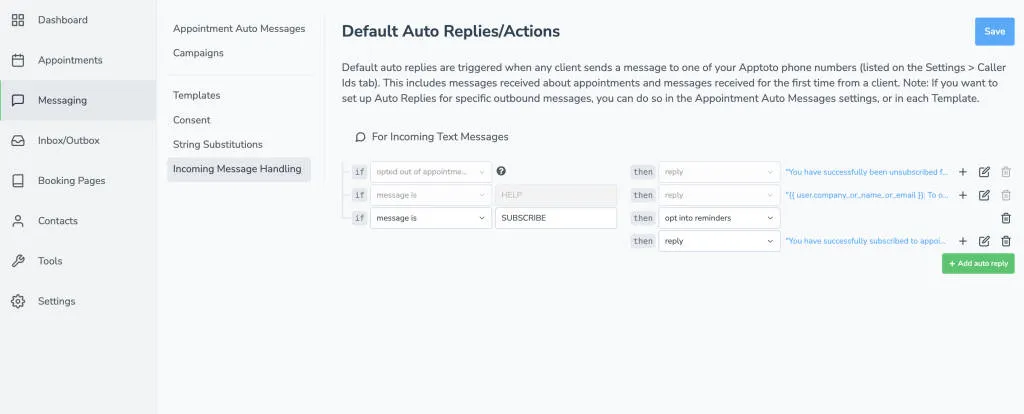
- Navigate to the Messaging > Incoming Message Handling tab
- You will have two default “Incoming Messages” already set up for the following Triggers: “Opted out of appointment messages” and “Message is: HELP.”
- These cannot be removed from your Auto Replies, nor can your action (“Reply”) be changed. However, you can change the Auto Reply text by clicking the blue text/link to the right of each action.
- A third default, Message is: SUBSCRIBE, is what lets a client who replied STOP put themselves back on your messages: it opts them into reminders and texts back a confirmation. Unlike the two above, this one can be edited or removed, and if you change the word or delete the reply, texting SUBSCRIBE stops working for your clients. See Stoplists.
- Click + or +Add Auto Reply to add a new Auto Reply, the pencil icon to edit an existing Auto Reply, and the trash can to remove an Auto Reply.
- Different triggers will allow you to take different actions. Available triggers and actions are listed below.
- Add any additional Auto Replies you want to add, and click the blue Save button.
Triggers
Section titled “Triggers”| Trigger | Message Types | Description |
|---|---|---|
| message is | SMS | The message must contain the specified word or phrase in the text field exactly as written. |
| message includes | SMS | The message must contain one or more of the specified words in the text field (not case-sensitive) |
| any message received | SMS | Fires if any message is received from the client |
| new conversation | SMS | Fires if the client begins a new conversation with you |
| opted out of appointment messages | SMS | Fires when a client opts out of receiving appointment messages |
| opted into appointment messages | SMS | Fires when a client opts into receiving appointment messages |
Actions
Section titled “Actions”| Action | Message Types | Description |
|---|---|---|
| reply | SMS | Reply with an SMS message back to the client |
| opt into reminders | SMS | Opts the client into receiving appointment reminders |
| opt out of reminders | SMS | Opts the client out of receiving appointment reminders |
| opt into marketing messages | SMS | Opts the client into receiving marketing messages |
| opt out of marketing messages | SMS | Opts the client out of receiving marketing messages |
| send email notification | SMS | Send an email notification to the client with their upcoming appointment details. |