
In-Event Commands
You can control messaging for individual appointments by adding special commands to the calendar event’s title, body, or location — without changing your Auto Messages settings. If Apptoto finds one of these commands in an appointment, it will apply the command to all participants in that event.
Top-Level Commands
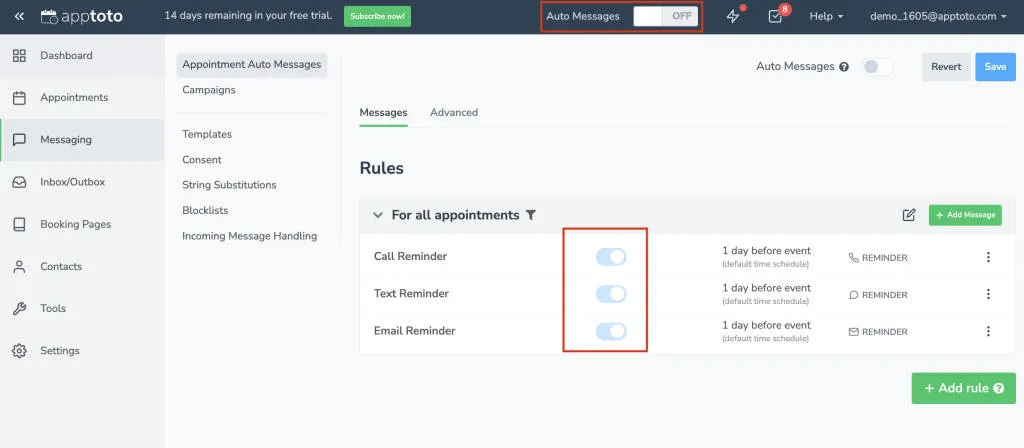
Section titled “Top-Level Commands”These work when your Auto Messages master switch (at top of every Apptoto page) is OFF and individual messages are ON. You must include the command in the title, body, or location of your appointment event.
| Command | Effect |
|---|---|
#auto / #apptoto / #enable | Send all enabled messages for this appointment |
Specific-Message Commands
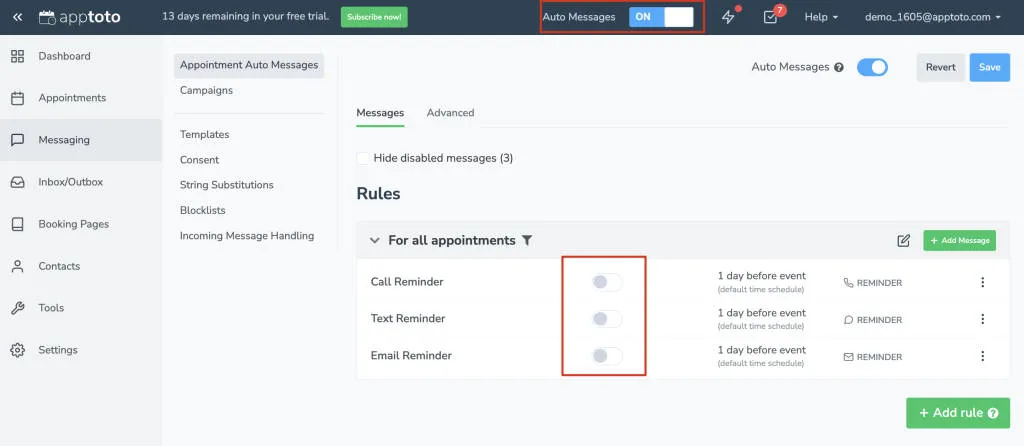
Section titled “Specific-Message Commands”These work when the master switch is ON and individual messages are OFF. You must include one of the command in the title, body, or location of your appointment event.
| Command | Effect |
|---|---|
#remind | Enable only Reminder messages for the appointment; disables Followup and Booking Confirmation messages |
#followup | Enable only Followup messages for the appointment; disables Reminder and Booking Confirmation messages |
#booking | Enable only Booking Confirmation messages for the appointment; disables the Reminder and Followup messages |
#sms or #text | Send all SMS messages for the appointment (even if they are disabled). |
#call or #voice | Send all voice call messages for the appointment (even if they are disabled) |
#email | Send all email messages for the appointment (even if they are disabled) |
Preventative Commands
Section titled “Preventative Commands”Use to prevent specific message types from going out, or to prevent specific appointments from being sent any messages. You must include the command in the title, body, or location of your appointment event.
| Command | Effect |
|---|---|
#skip | Do not send any auto messages for this appointment |
#noremind | Disable all of the Reminder messages |
#nofollowup | Disable all of the Followup messages |
#nobooking | Disable all of the Booking Confirmation messages |
#nosms or #notext | Disables all SMS messages for this appointment |
#nocall or #novoice | Disables all voice call messages for this appointment |
#noemail | Disables all email messages for this appointment |
#noautoreplies | Disables any auto replies or actions for this appointment |
Check-In State commands
Section titled “Check-In State commands”The check-in state commands are as follows, and are not case-sensitive. You must include the command in the title, body, or location of your appointment event.
| Command | Effect |
|---|---|
#Ontime | Marks the participant’s check-in state as “on-time” |
#Arrived | Marks the participant’s check-in state as “arrived” |
#Late | Marks the participant’s check-in state as “late” |
#Noshow | Marks the participant’s check-in state as “no show” |
[No Show] or [No-Show] | Marks the participant’s check-in state as “no show”. Put it in the appointment title, brackets included |